Why Enable Data Switching?
If you're using an Android device with Dual SIM (such as a physical SIM and an eSIM like a SecondSim UK line), you have the advantage of two mobile networks. However, Android devices normally use only your primary SIM for data.
By enabling Auto Data Switching, your Android phone will automatically fall back to your secondary SIM for internet access if your primary SIM loses signal. This is critical for keeping WhatsApp, emails, and navigation working smoothly when you travel through dead zones.
Data Usage Warning
When your phone switches to the secondary SIM, it will consume data from that plan. Ensure you have enough data on your second SIM to handle unexpected switching. If you are using our Unlimited Data plan, you can leave this on permanently.
How to Enable Auto Data Switching on Samsung Galaxy
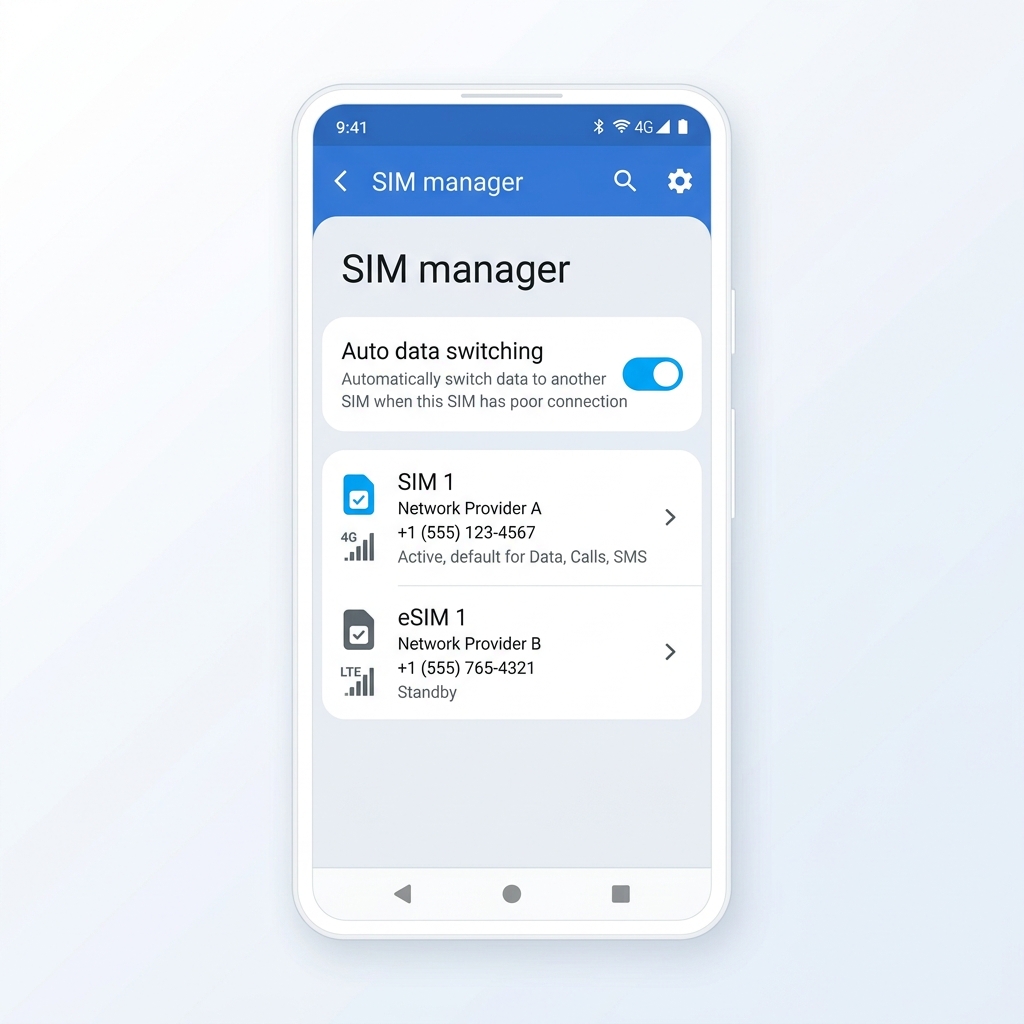
Samsung's OneUI has a built-in feature for this under the SIM manager.
- Open the Settings app.
- Tap on Connections, then SIM manager.
- Ensure both of your SIMs (SIM 1 and eSIM 1) are turned on.
- Scroll down to the bottom of the SIM manager page.
- Toggle on Auto data switching.
How to Enable Auto Data Switching on Google Pixel
On standard Android (Pixel devices), the setting is located within your Network preferences.
- Open the Settings app.
- Tap on Network and internet, then tap on SIMs.
- Select your Primary SIM.
- Scroll down and toggle on Switch mobile data automatically.
Testing Your Setup
You can easily test if Auto Data Switching is working by temporarily turning off your Primary SIM in the SIM manager. Your Android device should immediately flip the data connection over to your secondary SIM.