Why Enable Data Switching?
If you're using an iPhone with a physical SIM and an eSIM (like a SecondSim UK line), your phone has access to two completely different mobile networks. However, by default, iOS will rigidly stick to your "Primary" data network—even if it has zero bars—leaving you without internet.
By enabling Allow Mobile Data Switching, your iPhone intelligently falls back to your secondary line if the primary loses coverage. This is essential for maintaining an unbreakable connection whether you're commuting, travelling, or using your phone for business.
Wait, does it use my other allowance?
Yes. When your iPhone switches, it will consume data from your secondary plan. If you're on a limited plan, be aware of this. If you are using our Unlimited Data plan, you can let it switch freely without worrying about limits.
Step 1: Navigate to Mobile Service Settings
- Open the Settings app on your iPhone.
- Tap on Mobile Service (or "Cellular" in the US).
- Ensure both of your SIMs are active and toggled on.
Step 2: Access Mobile Data Options
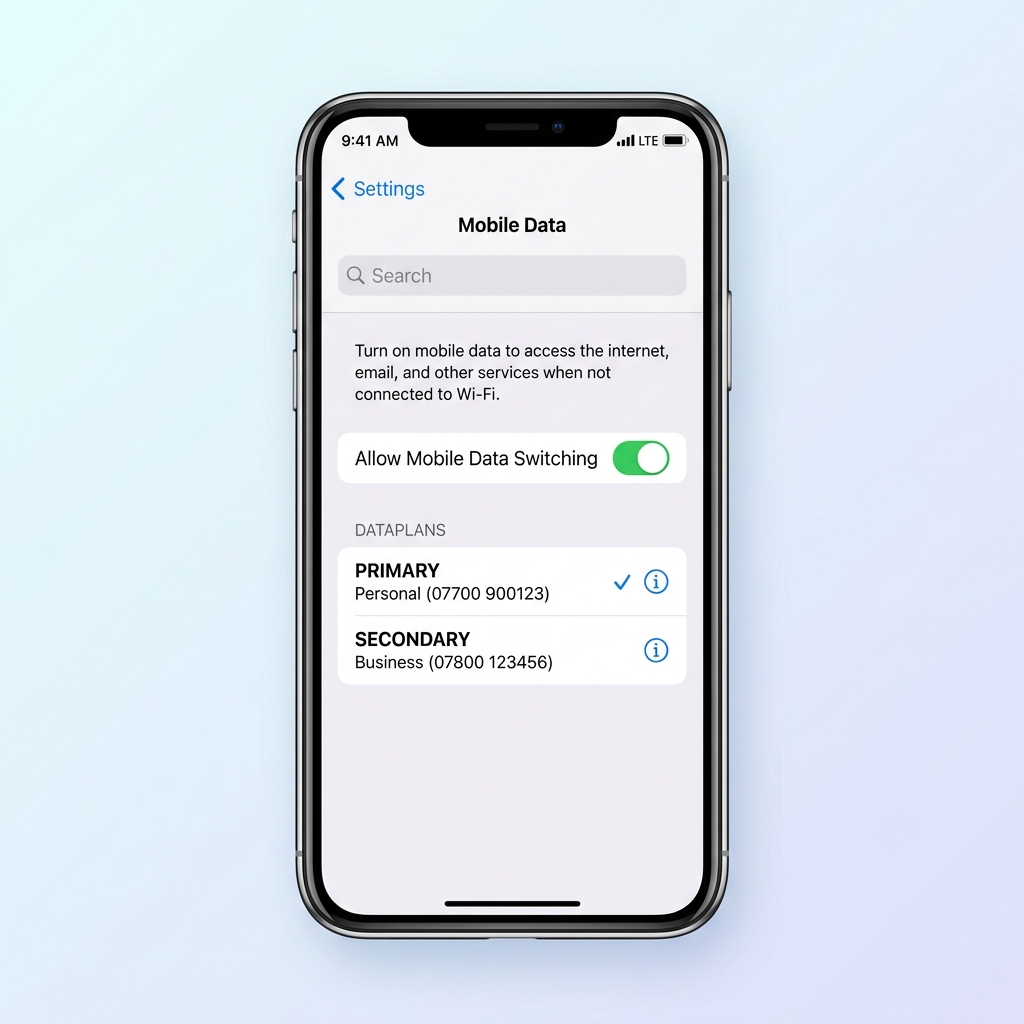
- Under the "Mobile Data" (or "Cellular Data") menu at the very top, tap to enter the data selection screen.
- You will see a list of your available SIMs (e.g., Primary and Secondary).
- Select the line you want to act as your default connection.
Step 3: Toggle Allow Mobile Data Switching
Directly beneath your list of SIMs, you will see a toggle switch. Turn on Allow Mobile Data Switching.
How to test if it's working:
The easiest way to test your configuration is to temporarily disable the primary line or go to an area where you know your primary network is dead. If "Allow Mobile Data Switching" is active, your iPhone will seamlessly bridge the connection over the secondary network, and you will continue receiving emails, WhatsApp messages, and notifications.